layout: true .logo[  ] --- name: inverse class: center, middle, inverse ## Intro to Reproducible Science Adapted from the Reproducible Science Curriculum _Special Thanks: Francois Michonneau, Hilmar Lapp, Karen Cranston, Jenny Bryan, and everyone else who contributed to these materials._ --- class: center, middle, inverse ## Reproducibilty is actually all about being as lazy as possible! -- Hadley Wickham (via [Twitter](https://twitter.com/hadleywickham/status/598532170160873472), 2015-05-03) --- class: middle ## Why Use Reproducible Methods? * More efficient. * Less redundant science. * Others can more easily build upon our work. --- ## Reproducibility & Your Research 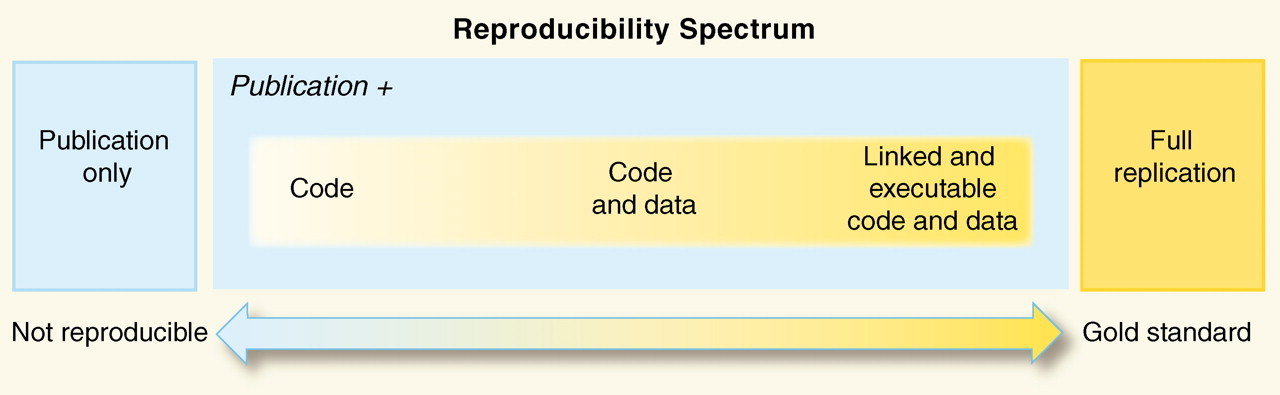 .caption[ Reproducibility spectrum for published research. Source: Peng, RD Reproducible Research in Computational Science Science (2011): 1226–1227 via Reproducible Science Curriculum] --- ## <a href="http://www.genomebiology.com/2015/16/1/274" target="_blank">Five selfish reasons to work reproducibly</a> _Florian Markowetz_ 1. Reproducibility avoid critical mistakes. 2. Reproducibility makes it easier to write papers. 3. Reproducibility helps reviewers see it your way. 4. Reproducibility enables continuity of your work. 5. Reproducibility helps to build your reputation. --- class: middle ## How to Make Work Reproducible > For research to be reproducible, the research products (data, code) need to be publicly available in a form that people can find and understand them. --- ## Who do we need to share with? * Collaborators * Peer reviewers & journal editors * Broad scientific community * The public --- class: top center .wCaption-50[ 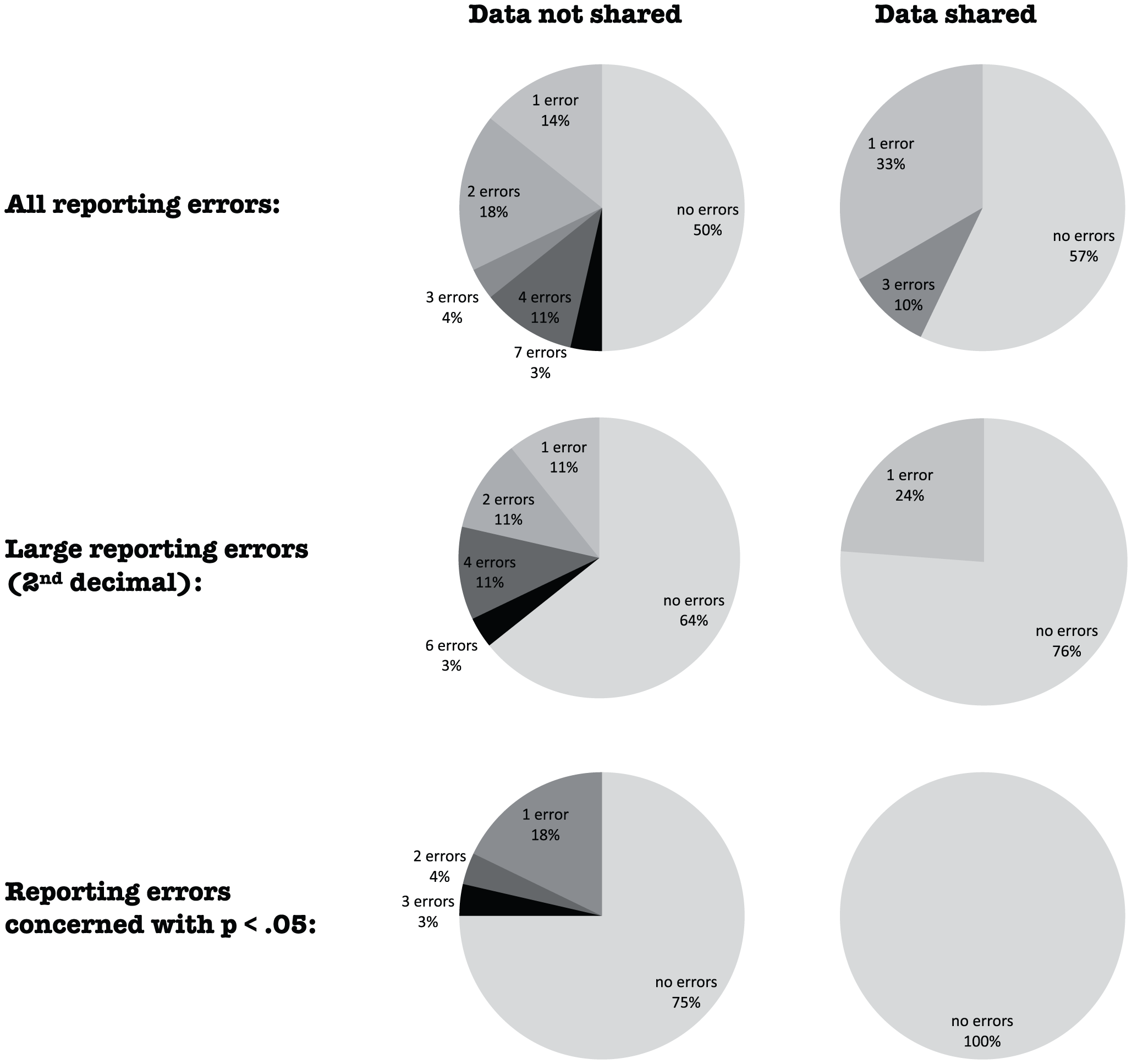 ] .caption[**Better Research**: Papers from which data were shared have fewer errors. <a href="http://dx.doi.org/10.1371/journal.pone.0026828" target="_blank"> Wicherts et al (2011) </a>] --- ## Better Research - Citation <a href="http://dx.doi.org/10.1371/journal.pone.0026828" target="_blank">Wicherts et al (2011) Willingness to Share Research Data Is Related to the Strength of the Evidence and the Quality of Reporting of Statistical Results.</a></small> --- ## Tools That Support Reproducibility **GitHub:** * Version Control * Collaboration * Dissemination --- ## Tools That Support Reproducibility **R Markdown / Jupyter Notebooks:** * Code Documentation * Dissemination --- ## Four Facets of Reproducibility 1. Organization 1. Documentation 1. Automation 1. Dissemination --- ## 1. Organization - Files & Directories The more self explanatory the better: * Consider overall structure of folders and files. * Use informative file names. --- .wCaption[  ] ---  .caption[<a href="http://journals.plos.org/ploscompbiol/article?id=10.1371/journal.pcbi.1000424" target="_blank"> Noble, William Stafford, 2009. A quick guide to organizing computational biology projects. </a> ] --- ## 1. Organization - Files File Organization should: * Reflect inputs, outputs and information flow. * Preserve raw data so it's not modified. * Carefully document & store intermediate & end outputs. * Carefully document & store data processing scripts. --- ## 1. Organization - Files  --- ## 1. Organization -- File Names File / Folder Names should be: * Machine readable. * Human readable. * Support sorting. --- ### Which Filenames Are Most Self-explanatory?  --- ## More on File Naming <a href="https://lwasser.github.io/class-activities/slide-shows/2-file-naming-jenny-bryan/" target="_blank">More on file naming & organization</a> -- from the Reproducible Science Curriculum. --- ## 1. Organization - Code Variables * Use self explanatory variable names. * Comment code so your future self can understand it. --- ## 1. Organization - Code Variables .one-half[ **More Readable** ```r # import canopy N values for # decid & coniferous forest sampling conifer.N <- read.csv("conifer-sampling.csv", header=TRUE, sep=",") decid.N <- read.csv("decid-sampling.csv", header=TRUE, sep=",") # Calc total forest N total.N <- conifer.N + decid.N ``` ] .one-half[ **Less Readable** ```r # import data sumA <- read.csv("sample1.csv", header=TRUE, sep=",") sumB <- read.csv("sample2.csv", header=TRUE, sep=",") sum <- sumA + sumB ``` ] --- ## 1. Organization Pro-Tip > A variable name that describes an object is more useful than a random variable name. --- ## 1. Organization - Benefits * Your future self will be able to quickly find files. * Colleagues will be able to more quickly understand your workflow. * Machine readable names can be quickly and easily sorted and parsed. --- ## 2. Documentation Document all workflow steps: * You can remind your future self of your workflow. * Others can see and understand your work. * Future "re-analysis" of your data is more efficient. --- ## 2. Documentation - Code Code should be easy to understand with clear goals: --- ## 2. Documentation - Code > Document your code even if you think it's clear and simple. Your collaborators > & your future self will inevitably have an easier time working with it down the road. --- ## Documentation Pro-Tip 1 > Add comments around functions that describe purpose, inputs and outputs. --- ## Documentation Pro-Tip 2 > Avoid proprietary formats: Use text files (.txt, .md) that don't require special tools to open. --- ## Documentation Pro-Tip 3 > Markdown to style documentation = machine readable, small file size, low overhead. --- ## Documentation Pro-Tip 4 > Use coding approaches that connect data cleaning, analysis & results Example Tools: R Markdown and IPython / Jupyter notebooks allow you to publish code and results in one (or more) output files. --- ## 3. Automation Automate your workflows when possible by: * Using scripts vs. point & click approaches. * Using function-based coding vs. continuous code where tasks are repeated. * Developing scripted workflows rather than series of tasks (e.g. makefiles). --- ## 3. Automation Benefits - Save Time * More efficient to modify and repeat an analysis down the road. * Easier for reviewers and colleagues to see even aspect of your methods. * Self documenting methods - your future self will likely forget small steps. --- ## 3. Automation Pro-Tip > A script may mean more time spent up front, but will save time in the long run. --- class: inverse, center, middle ## DRY Don't Repeat Yourself --- ## 3. Automation - DRY > If your analysis is composed of scripts, with repeated code throughout, it will be more time consuming to maintain and update. <a href="http://reproducible-science-curriculum.github.io/2015-09-24-reproducible-science-duml/slides/01-automation-slides.html#9" target="_blank">Reproducible Science Curriculum - Automation</a> --- class: center, middle ## Automation - Create Modular Code Modularity -- use functions to write code in reusable chunks. --- class: center, middle  --- ## Automation - Functionalize * Variables created within a function are temporary. * Code with functions is easier to read / cleaner. * Supports better documentation. * Supports testing. * Allows for code re-use with other data. --- ## 4. Dissemination > Publishing is not the end of your analysis, rather it is a way towards > your future research and the future research of others. --- ## 4. Dissemination - Why * Funding agency / journal requirement. * Community expects it. * Increased visibility / citation. * More efficient, less redundant science. --- ## 4. Dissemination workflow Example Workflow / Tools: * Document workflow: **R Markdown / Jupyter Notebooks** * Collaborate with Colleagues / Version Control : **GitHub** * Publish Data Snapshot: **FigShare, Dryad, etc** * Share workflow: ** RPubs , IPython Notebook Viewer** --- ## Facets of Reproducibility: Tools / Skills 1. Documentation: RMarkdown / Jupyter Notebooks, GitHub 2. Organization: File naming / organization. 3. Automation: Code documentation, Efficient Coding 4. Dissemination: GitHub, Rpubs, ... --- name: inverse class: center, middle, inverse ## Improve This Presentation This presentation was created using markdown and built via jekyll / github. Suggest changes via a PR or an issue in the repo: <a href="https://github.com/lwasser/class-activities/blob/master/_slide-shows/1_intro-reprod-science.html" target="_blank"> View on GitHub </a>